Truly unlimited webhosting

I know, I know everybody says “unlimited” is a marketing stunt, as always there is “fair use” in place. However as long as your website is not super heavy on snagging server resources, Shared unlimited hosting offers should be good to go.

E.g. our own project Scene World works on DreamHosts SharedUnlimited which they unfortunately recently discontinued.

As of February 2026, I found the following alternatives:

Razorhost

One of them is Razorhost from India for just 1.09$ per month for their “Best for Unlimited” “Business” plan, what could possibly go wrong?

Well a lot, as they have horrible ratings on Trustpilot.

Asura Hosting

Another slightly better option is Asura Hosting which operates out of Wyoming, USA.
Strange is, that their localized website for the Netherlands can be picked as a location but appears to be simply down.

Unlike DreamHost they do not offer free 24/7 chat support, but claim every support ticket is replied to within 20 mins. their current response time is always written in the homepage’s footer, and at the time of writing this, it has been 27 minutes on average according to them. It is a mixed bag according to Trustpilot reviews, which is still a major improvement over Razorhost.

They let you choose between DirectAdmin and cPanel interfaces, of which the later adds 1$ more to the price. Unlimited has 6x CPU Allocation and 3 GB RAM, while Unlimited Plus has unlimited RAM allocation but 10x CPU Allocation. Elite has “unlimited” CPU allocation, as well.

Just like DreamHost, they also offer moving your webspace allocation to the EU, (i.e. the Netherlands in case of DreamHost), according to Asura Hosting’s website tho, their EU hosting is in Luxembourg with other non-EU alternatives of London, New York and Montreal in Canada.


unlimited web hosting

If you don’t mind hosting in the UK, going with the former EU member as a location might be the best way to go.

They do have fantastic service ratings on Truspilot which are just excellent.

With 2 CPUs, 4GB RAM and 50 Entry Processes, it is better in RAM but worse in CPU allocation than the Unlimited package for Asura Host, but at least they are honest about their resources, which Asura Hosting does not talk about in the higher plans at all.

Brixly


Also in the UK, the only one offering Chat Support (during UK Working Hours only though), next to Ticket and Email Support for 24/7.
Also the only one including DDOS protection (next to unlimited web hosting) per default.

Their Trustpilot sits between the ratings of Razorhost and Asura Hosting

Infinity Plus with unlimited storage has its resources capped to 2 CPU Cores and 2GB of RAM, while Premium Hosting has virtually no resource cap but costs a whopping 29.95 Pounds compared to the Infinity Plus for just 9.95 Pounds.

NetNerd

Again in the UK, they offer unlimited shared webspace, as well and are very willing to state what unlimited means to them. Something DreamHost used to do too, when it was still in the cards for new customers.

Just like unlimited web hosting, they also come with excellent trustpilot ratings.

active24

Despite their German top level domain, they actually are operating out of Prague which provide services to customers in Spain, Holland, Germany and Great Britain.
For their local customers, they run a dedicated website at active24.cz in the Czech language.
They do however have a maximum of 10 websites, so it isn’t truly unlimited.
Their service also also rated as poorly as the artificially imposed website limit.

spaceship

Being the only ones including servers in Asia, i.e. Singapore makes them standing out of the crowd already, interestingly, their are a number of surprising limitations, like email is not free, and they communicate this openly in the disclaimer in the footer as folows:

Our CPU and RAM resource limits are for burst allowance, which helps your website cope with high traffic. This allowance is only for a limited time, as shown in our AUP.

Spacemail™ is provided free with Web Hosting for one year. It can be used with domains but not with subdomains.

Spaceship provides unlimited free SSL certificates for Pro and Supreme Web Hosting plans, and 5 SSL certificates for Essential Web Hosting plans. When hosting subscriptions are canceled, the free SSL certificates are automatically canceled.”

Perhaps it lands for you, as it also comes with an excellent Trustpilot rating.

It does come with a filelimit, though
Always glad to see when my blog posts help others

Occupationally over the past 21 years, some of my blog posts are picked up and referred to by others. Might it be my blog post about running the Feeble Files on Windows XP discussed in a adventure fan forum in Poland, a Brazilian IT professor emailing me, that my blog is often used and referred to during his lectures for his students, or how to find hidden 64bit driver updates like for Epson scanners or the fact that there are firmware updates fixing wifi connectivity for Belkin phones.

(I wouldn’t call myself a genious though as the guy in the Belkin phone post above did, but you are welcome! 🙂 ).

Do not worries folks, I try to keep this blog alive and running as long as I am alive.

make Vivaldi 7.1 and up stop running in background when closed

One of the settings that are now enabled when updating your Vivaldi installation to 7.1 and up is, that the browser won’t stop running completely when closed, which is a problem e.g. when you have full-screen applications like gaming and the M3 mail notfications of new emails coming in keep popping up, or the bug that POP3 emails no longer are populated into your inbox anymore, appears.

Rather than always manually kill the process using Windows task manager, you can disable this behavior!

I found the solution thanks to this thread on reddit, however it’s outdated.

The current way of finding this setting and disabling is, is, going to the address
chrome://settings –> settings, there you can find the option “Continue running background apps when Vivaldi is closed”, disable it.

Troubleshooting missing iPhone/iPad, iPod Touch functionality in new iTunes 12.13.9.1 under Windows 11 25H2 (works with iOS26.x & iPadOS26.x)

Key Takeaways

  • New iTunes versions (like 12.13.9.1) can dynamically remove features if an iPhone isn’t recognized during installation. Which can be a problem is iPhone detection is a bit wonky, as in my case with a new PC freshly built in May 2025 and freshly installed Windows 11 (had to install it twice!).
  • Old drivers can persist in Windows even if the software was never installed. (in my case Apple iPhone drivers of Tenorshare Inc., despite I never had their 3rd party iPhone Management Software installed on this machine.

  • It can happen that updating to newer iTunes versions like 12.13.9.1 and up, still causes the iPhone/iPad/iPod Touch functionality being removed from iTunes. it can be safely skipped for now, as long as iTunes works and the iPhone is recognized. However, future iOS updates might eventually require a newer iTunes version.


    Step-By-Step instructions how to go about
  1. Identified the problem:
    • Windows had an old Tenorshare driver (oem11.inf) in its driver store.
    • This caused iTunes to fail to detect the iPhone correctly.
    • So, I uninstalled the new iTunes 12.13.9.1 (release date 2025-10-15) and downloaded previous version iTunes 12.10.11 (release date March 08, 2024, changelog / alternative download)
    • faced error message “Can’t read iTunes library because it was created by a newer version
    • Went to my iTunes music folder (usually):

      C:\Users\<yourname>\Music\iTunes\
      Renamed
      iTunes Library.itliTunes Library (newer).itl
      Started iTunes 12.12.10.1 again.
  2. Driver cleanup:
    • Used pnputil in the Administrator Command Prompt to list with pnputil /enum-drivers
    • Found it’s driver “oem11.inf” in my case
    • Removed Tenorshare drivers: pnputil /delete-driver oem11.inf /uninstall /force
    • After removal, Windows correctly used the Apple driver (from 2017) for the iPhone when I reconnected my iPhone.
  3. Ensuring iTunes recognition:
    • Restarted the Apple Mobile Device Service to fix “No iPhone found” in iTunes.
    • Confirmed that the iPhone is recognized properly after reconnecting.

TL;DR: The older iTunes version 12.10.11 works better with iPhones on Windows 11, since newer versions disable device support if no iPhone is connected during installation.

Run Simon The Sorcerer Swampy Adventures on Windows 11 25H2

You will need to use ScummVM for this

after that is installed, do the following:

1) Run Setup.EXE in the “CD Rom Root/GamePack” folder
2) You receive an error messsage that 16 bit versions of Install Shield, but there is a way to replace the routine with a 32bit one. Click on “More Information…”
3) this opens page https://learn.microsoft.com/en-us/troub … plications
4) Click on download and install the 16-bit InstallShield Support package
5) After installation, repeat Step 1)
6) The Game Pack installs now
7) add game one by one, and finally all 4 games of the game pack are found and listed in ScummVM.
8) copy all the *.VGA files from the CD to the SimonGamePack folder on the SSD’s game install folder

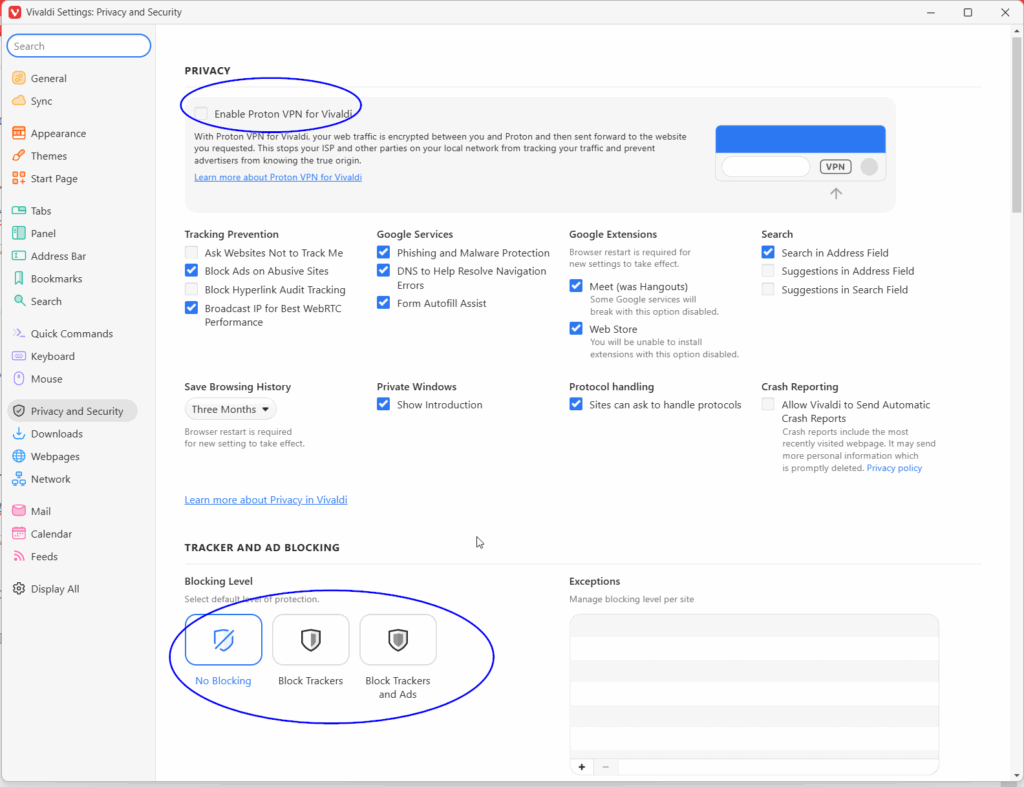
When updating to Vivaldi 7.6, certain settings are applied automatically without prior notice (Ad blocking & tracker blocking, VPN!)

When updating to the latest Vivaldi version, i.e. its major 7.6 release, I noticed, that certain websites no longer displayed or youtube running super slow experiecing issues and the “how to fix” or “learn why” links on either sites, didn’t provide any solution or help for me.

It turns out, that the default settings of your browser, even when updating from a previous version of Vivaldi, have changed, and therefore your settings are overwritten and new rules are applied without warning, prompting or prior notice!

So, I did resume a broken functionality at Vivaldi first, so when I reported the issues with youtube and winfuture.de, I received the following:

Vivaldi Team wrote:
> Hi,
>
> Thanks for reporting this issue.
>
> Issue can be caused by strict ad and tracker blocking, and depends which block list is used in Settings → Privacy → Tracker and Ad Blocking → Manage Sources.
>
> Please [disable Vivaldi Blocker for the site]([1]https://help.vivaldi.com/desktop/privacy/tracking-and-ad-blocking/#Blocking_per_site).
>
> If you use a ad/tracker-blocker extension, disable for the site.
>
> Thank you for your time and using Vivaldi!
>
> Best wishes,
> —————————————————————————————-
> [1] https://help.vivaldi.com/desktop/privacy/tracking-and-ad-blocking/#Blocking_per_site

turns out the following settings have been altered from:

why does it put it to blocking enabled for trackers and ads and enabled Proton VPN automatically without asking me when I updated to 7.6?

This is almost a scandal.

The browser should let me change settings in my own will only!

Anyway, it works now as expected, again.

Getting Sonic & All Starts Transformed Collection to run in Windows 11 25H2

So the new OS version 25H2 of Win11 created new issues, what worked fine in Win 11 24H2 no longer does.

One of the examples here is the Sonic & All Stars Transformed Collection.

Issue no one is that the config tool does still not open (didn’t open in 24H2 either), her browse the install folder and double click to run “Launcher.exe” manually.

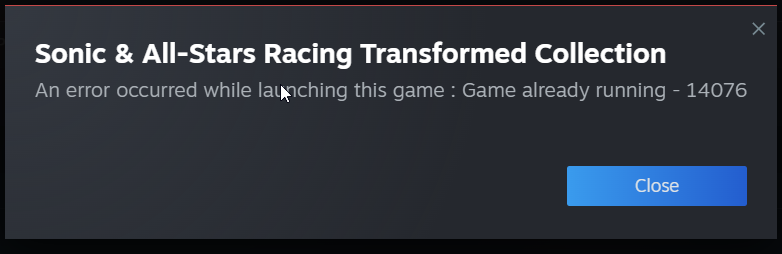
A new isssue however is this problem here as soon as you try to start the game:

its failing at running the install script because dotnet4 stops with error that it is already shipped with this version of windows.

delete the file “installscript.vdf” in the installation folder of the game.

After that, the game will launch again.

MURDERED: SOUL SUSPECT™. Nubarron & certain Double Dragon games require you to set a FPS / Hz limit (Max frame rate)

Once in a while you come across a game that seems to be unplayable, as it either runs too fast or certain actions like jumps cannot be mastered, in this case the game is tailored towards the Hz of your monitor, and since many modern systems have 120 Hz, 144 Hz, 165 Hz or even more and a lack of VSync in the game, you have to manually fix the game in question to a fixed frame rate.

In my case of owning an Nvidia RTX 4060 at the moment, here are some examples I came across:

MURDERED: SOUL SUSPECT™: Frame rate remains unstable, no matter if VSync is n or off within the game: Max Frame rate setting necessary: 58 FPS, Bonus: If you Can’t walk past a demon because of a glitch with the priest, toggle VSync.

Nubarron: The adventure of an unlucky gnome: If you find yourself being Stuck because Triple mudslide and brambles jumps have a too narrow margin for error thrice: Max Frame rate setting necessary: 60 FPS

Double Dragon Advance: Game runs too fast, and certain gaps are impossible to jump over: Max Frame rate necessary: 58 FPS

Double Dragon IV: certain gaps are impossible to jump over: Max Frame rate necessary: 60 FPS

Super Double Dragon: Game emulation runs too fast: Max Frame rate necessary: 60 FPS

Your local savegame of a Steam game got corrupted, now what?

here is how to fix it with any game that support Steam Cloud Saving in the future if that ever happens to you with any game again:

Switch from within the game back to Steam (E.g. CRTL & Enter to switch to Window mode, Windows Key, or AlT & Tab or CRTL & ALT & Del,. depending on the game, in Steam, go to your library to the game ypu have issues with –> right click –> properties –> disable Steam Cloud –> Kill the game using WIndows Task Manager

This way your savegame that is still fine and lives online on the Steam Cloud Servers are not synced with the broken local ones when exiting the game.

In this moment, it is a good idea to make a backup copy of your local savegame folder just in case, tho

Now, re-enable Steam Cloud in the games properties in Steam and Play the game again, this way the intact savegame files are downloaded from the Steam Cloud and the corrupted local ones being overwritten, and voilla 🙂

Running World Racing 2 (original 2005 release) in Windows 11 24H2

The good: The final patch for the game has officially SecurRom removed so that the game runs under Windows 7 and up without a no-CD patch.

The bad: The developers never tested it – also most 1.4.3 updates require the previous update being applied 1.3.3 beforehand.

Despite the German description contradicting itself, by first stating the update 1.3.3 is included, and later on claiming 1.3.3 has to be installed first, this patch’s RAR archive really includes everything needed to update the master version 1.1.1 to 1.4.3 in one go!

Furthermore, make sure that all secondary monitors are disabled and when asked by Windows compatibility assistant after closing the game if compatibility mode should be applied, select “Program ran flawlessly”!

Caution! Do not run the game after installation! Apply the above patch first! Trying to run the game before, will cause the Starforce2 copy protection to install and Windows 11 will refuse to boot as a consequence!:


You can work around this by selecting “7) Disable driver signature enforcement” in the Startup Settings Menu (F8) .

After Windows 11 has booted up completely, run StarForce’s Driver Remover Utility.

After the next reboot, Windows 11 will boot up again flawlessly.

By continuing to use the site, you agree to the use of cookies. more information

The cookie settings on this website are set to "allow cookies" to give you the best browsing experience possible. If you continue to use this website without changing your cookie settings or you click "Accept" below then you are consenting to this.

Close